 NEWS
NEWS
iPhone 18 Pro Colors Leaked: Dark Cherry and Sky Blue Rumored
 09/03/2026
 963
963
Apple's upcoming iPhone 18 Pro and iPhone 18 Pro Max could once again launch with three color options, according to longtime leaker Sonny Dickson.
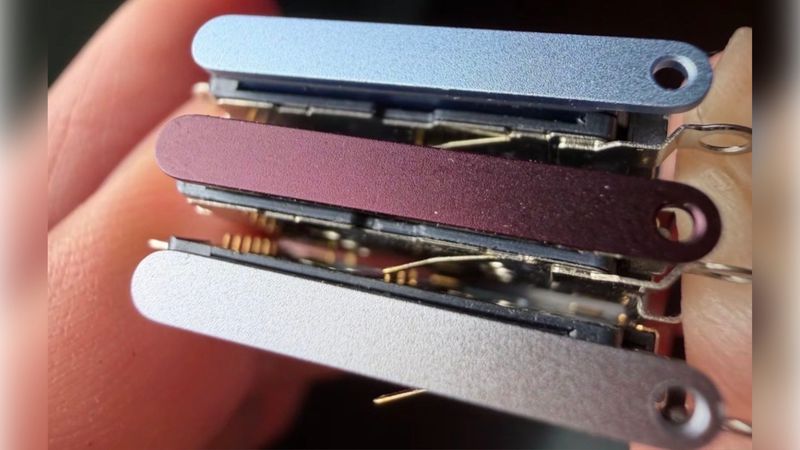
Dickson has shared an image showing what appear to be iPhone 18 Pro SIM card trays in different colors, suggesting that Apple's next-generation Pro models could be available in Silver, Dark Cherry, and Sky Blue.
iPhone 18 Pro May Get Three New Colors
The leaked SIM card trays point to three potential iPhone 18 Pro colors:
●Silver
●Dark Cherry
●Sky Blue
If accurate, Apple could be moving away from the darker color options seen in previous generations.
For comparison, the current iPhone 17 Pro is available in Cosmic Orange, Silver, and Deep Blue.
Dickson said these are the only three iPhone 18 Pro colors he has encountered in recent months. However, the leaker previously shared iPhone 18 Pro dummy units that included a Black option.
When asked about the black dummy units, Dickson said black dummies are produced every year for testing purposes, but that Apple no longer appears to favor black as an official color for its flagship iPhones.
Will the iPhone 18 Pro Come in Black?
The possibility of a black iPhone 18 Pro remains uncertain.
Chinese leaker Instant Digital previously claimed that Apple would not offer a black color for the iPhone 18 Pro. This would continue a trend that began with Apple's previous high-end iPhones, which moved away from traditional black and dark gray finishes.
Other reports have suggested a wider selection of colors. Macworld previously claimed that Apple could offer Light Blue, Dark Cherry, Dark Gray, and Silver options.
With different leaks pointing to different color combinations, Apple's final iPhone 18 Pro color lineup remains unclear.
SIM Card Tray Provides a Clue
The leaked SIM card trays are particularly relevant because not every iPhone sold worldwide includes a physical SIM tray.
iPhones sold in the United States, Canada, and several other markets use eSIM technology and do not include a physical SIM card tray. However, iPhones sold in markets including Europe, Japan, China, and Australia still feature SIM trays.
The exception is the iPhone Air, which reportedly uses an eSIM-only design regardless of the market.
iPhone 18 Pro Launch Date
We won't have to wait much longer to find out which colors Apple ultimately chooses.
The iPhone 18 Pro and iPhone 18 Pro Max are expected to be unveiled at Apple's September event next week. The event is also expected to introduce Apple's first foldable iPhone, reportedly known as the iPhone Ultra.
Apple's official announcement should finally settle the debate over the iPhone 18 Pro colors, including whether Black will return to the lineup.
Source: Macrumors










