
NEWS

M6 iMac Coming This Year in New Colors

08/24/2026

48

Apple is readying new iMac models with an upgraded chip and new color options, according to Bloomberg's Mark Gurman.
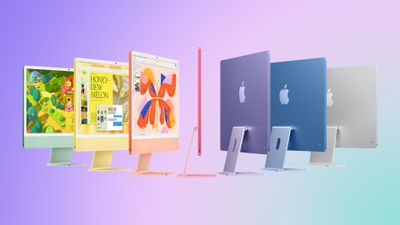
M6 iMac Coming This Year in New Colors
Writing in his latest Power On newsletter, Gurman says the new version is likely to be an updated 24-inch model with an M6 chip, replacing the existing M4 model that arrived in October 2024.

New colors are also said to be on the menu, though Gurman does not say what they are. The current ‌iMac‌ comes in seven colors, including green, yellow, orange, pink, purple, blue, and silver.

Otherwise, no major design changes are expected. Apple is reportedly developing a 24-inch ‌iMac‌ with an OLED display, but this won't arrive for several years.

"All signs point to the M6 models being close to launch," says Gurman, with the new models expected to arrive before the end of the year.

Source: Macrumors

Windows
Mac OS
iOS
Linux
3uTools
Win 64-bit For this device
V9.08 2026-08-18
Download
Win 32-bit For this device
V9.08 2026-08-18
Download
3uTools
Intel Chip How to Identify Chip Type
V9.06 2026-08-20
Download
Apple Silicon
V9.06 2026-08-20
Download
How to Identify Chip Type
1.  Click the Apple icon in the top-left corner of the screen and select About This Mac.
2.  Check the Processor or Chip field to determine if it is "Intel" or "Apple".
Please use the 3uTools PC client to install the iOS client:
1、 Install either the Windows or Mac version of 3uTools on your computer
2、 Open the PC client and connect your device to the computer via USB cable
3、 After the connection is successful, wait for the computer to automatically install the mobile app for the device, or locate “Install Mobile App” on the computer and manually click to install.
3uTools
deb file
V9.02 2026-08-19
Download
rpm file
V9.02 2026-08-19
Download
Windows
Windows
iOS
iOS
Android
Android
TV
TV
3uAirPlayer
Win 64-bit For this device
V6.0.6 2026-06-26
Download
Win 32-bit For this device
V6.0.6 2026-06-26
Download
iOS Device Mirroring (No App Required)
1、 Install 3uAirPlayer on the Windows PC
2、 Open Control Center and select Screen Mirroring
3、 From the list, choose your PC to start mirroring
4、 Or connect your iOS device to the PC via USB to begin mirroring
Scan to get "3uAirPlayer" App
3uAirPlayerTV
 
TV System Requirements: Android 7.0 or later
Download the TV installation package, copy it to a USB drive, insert it into your TV or set-top box, then select the file from the home screen to install.




