 NEWS
NEWS
Apple Sports App Updated With 2026 World Cup Features, Expands to 90 More Countries
 05/20/2026
 1766
1766
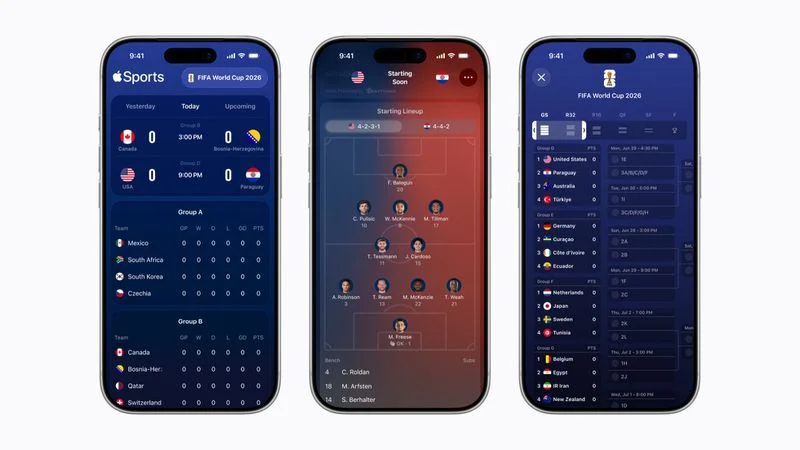
Apple today announced that its Apple Sports app is now available in more than 90 additional countries, including Australia, New Zealand, Japan, India, Singapore, South Korea, Taiwan, Thailand, the Philippines, Saudi Arabia, the United Arab Emirates, South Africa, and many others across the Asia-Pacific, Middle East, and Africa.
The app was already released in North America, South America, and Europe. In total, it is now available in 170 countries and regions around the world.
Apple also said the app offers these 2026 FIFA World Cup features:
- Tournament bracket view: The clean, scrollable view of matchups and results for each round allows fans to easily track a team's progression from the group stage through their final match.
- Visual formations: Enhanced game cards feature visual formations for each team's starting lineup to provide deeper tactical insight ahead of each match.
- One tap to Apple News: Apple News connects fans directly to comprehensive editorial coverage, including the latest headlines.
Apple Sports supports the Live Activities feature, allowing users to follow their favorite World Cup teams and keep track of scores for each match at a glance on the iPhone's Lock Screen or Dynamic Island, and on the Apple Watch.
"The World Cup unites fans across the globe, making it the ideal moment to bring Apple Sports to even more users," said Oliver Schusser, Apple's vice president of Music, Sports, Apple TV, and Beats. "Apple Sports was designed to be fast and simple, giving fans an easy way to stay on top of scores, stats, and the action that matters most in real time."
The app remains available on the iPhone only.
Source: Macrumors










