
NEWS

Everything New in iOS 26.4 Beta 4

03/10/2026

100

Apple is continuing to test the iOS 26.4 beta, and the latest update is now available for developers and public beta testers. As testing goes on, there are fewer new features in each beta, but today’s release adds new emoji characters and a few other changes.


New Emoji


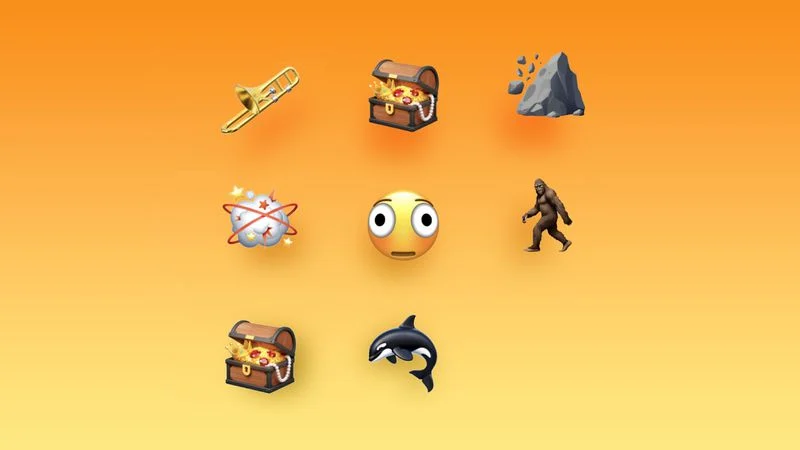
Apple added new emoji characters, including trombone, treasure chest, distorted face, hairy creature, fight cloud, orca, and landslide.
 

Everything New in iOS 26.4 Beta 4


There are also new skin tone modifiers people wrestling and dancers with bunny ears, as well as a gender neutral option for the ballet dancer emoji.


Reduce Bright Effects


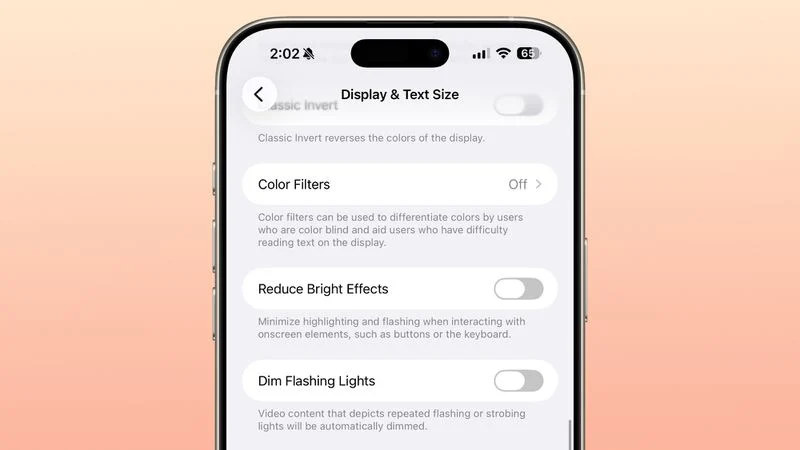
Apple renamed the prior Reduce Highlighting Effects Accessibility setting to “Reduce Bright Effects,” and explained what it does.
 

Everything New in iOS 26.4 Beta 4


Apple says the feature "minimizes highlighting and flashing when interacting with onscreen elements, such as buttons or the keyboard.


RCS Encrypted Messaging


Apple has removed the RCS end-to-end encryption beta in the fourth beta of iOS 26.4 after testing it in the prior three betas. Apple already said that end-to-end encryption for ‌RCS‌ would not launch in the iOS 26.4 update, and would instead be introduced in the future.


Apple tested end-to-end encryption for iPhone-to-iPhone ‌RCS‌ conversations, and iPhone-to-Android conversations. iMessage communications are already encrypted, but in a future iOS update, full implementation of ‌RCS‌ encryption will mean that iPhone-to-Android text message conversations have the same level of encryption.


New Device Support


iOS 26.4 and iPadOS 26.4 beta 4 are the first betas that are able to be installed on the new iPhone 17e and M4 iPad Air.


 

Windows
Mac OS
iOS
Linux
3uTools
Win 64-bit For this device
V9.02 2026-02-10
Download
Win 32-bit For this device
V9.02 2026-02-10
Download
3uTools
Intel Chip How to Identify Chip Type
V9.01 2025-12-31
Download
Apple Silicon
V9.01 2025-12-31
Download
How to Identify Chip Type
1.  Click the Apple icon in the top-left corner of the screen and select About This Mac.
2.  Check the Processor or Chip field to determine if it is "Intel" or "Apple".
Please use the 3uTools PC client to install the iOS client:
1、 Install either the Windows or Mac version of 3uTools on your computer
2、 Open the PC client and connect your device to the computer via USB cable
3、 After the connection is successful, wait for the computer to automatically install the mobile app for the device, or locate “Install Mobile App” on the computer and manually click to install.
3uTools
deb file
V3.01 2025-11-20
Download
rpm file
V3.01 2025-11-20
Download
Windows
Windows
iOS
iOS
Android
Android
TV
TV
3uAirPlayer
Win 64-bit For this device
V6.0.2 2025-11-19
Download
Win 32-bit For this device
V6.0.2 2025-11-19
Download
iOS Device Mirroring (No App Required)
1、 Install 3uAirPlayer on the Windows PC
2、 Open Control Center and select Screen Mirroring
3、 From the list, choose your PC to start mirroring
4、 Or connect your iOS device to the PC via USB to begin mirroring
Scan to get "3uAirPlayer" App
3uAirPlayer TV V1.0.18
2025-11-28
TV System Requirements: Android 7.0 or later
Download the TV installation package, copy it to a USB drive, insert it into your TV or set-top box, then select the file from the home screen to install.



