NEWS

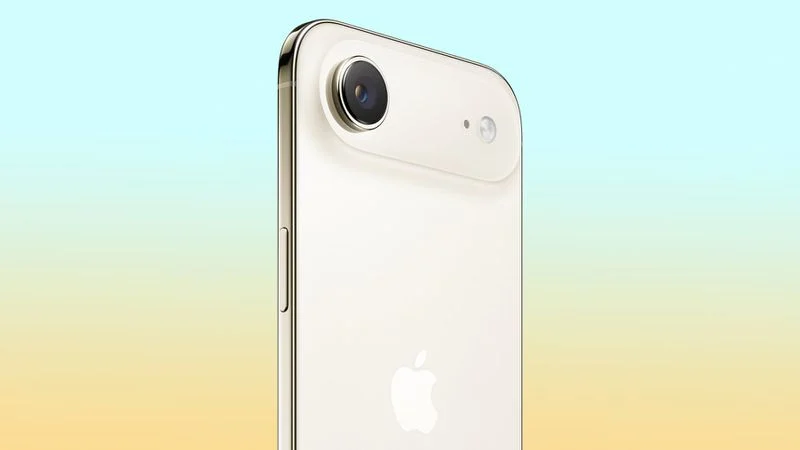
iPhone Air 2 Could Still Launch Next Year

12/25/2025

55

 iPhone Air 2 Could Still Launch Next Year


Apple's next-generation iPhone Air could still launch in the fall of 2026, according to the Weibo leaker known as "Fixed Focus Digital."


The leaker claims to have been told by sources that the second-generation ‌iPhone Air‌ will launch in the fall. Meanwhile, the iPhone 17e is said to already be in mass production ahead of unveiling at a spring product launch event.


The rumor comes in contrast to an array of corroborated reports that the second-generation ‌iPhone Air‌ has been delayed until March 2027, where it is expected to launch alongside the standard iPhone 18 and a lower-end ‌iPhone‌ 18e. The second-generation ‌iPhone Air‌ was originally rumored to launch alongside the ‌iPhone 18‌ Pro, ‌iPhone 18‌ Pro Max, and foldable ‌iPhone‌ in the fall of 2026, but poor sales of the debut model apparently led Apple to delay the launch.


The second-generation ‌iPhone Air‌ is rumored to address complaints about the device by adding a second rear camera and lowering its price. A lighter weight, vapor chamber cooling, and a larger battery capacity are also among the rumored new features.


It is still possible that a new ‌iPhone Air‌ could launch in the fall of next year, especially if Apple has expedited development of new features, since this was the original scheduled launch time frame. Nevertheless, it would be surprising if the multitude of rumors indicating a delayed launch were mistaken.


Source: Macrumors

Windows
Mac OS
iOS
Linux
3uTools
Win 64-bit For this device
V9.0 2025-11-11
Download
Win 32-bit For this device
V9.0 2025-11-11
Download
3uTools
Intel Chip How to Identify Chip Type
V9.0 2025-12-02
Download
Apple Silicon
V9.0 2025-12-02
Download
How to Identify Chip Type
1.  Click the Apple icon in the top-left corner of the screen and select About This Mac.
2.  Check the Processor or Chip field to determine if it is "Intel" or "Apple".
Please use the 3uTools PC client to install the iOS client:
1、 Install either the Windows or Mac version of 3uTools on your computer
2、 Open the PC client and connect your device to the computer via USB cable
3、 After the connection is successful, wait for the computer to automatically install the mobile app for the device, or locate “Install Mobile App” on the computer and manually click to install.
3uTools
deb file
V3.01 2025-11-20
Download
rpm file
V3.01 2025-11-20
Download
Windows
Windows
iOS
iOS
Android
Android
TV
TV
3uAirPlayer
Win 64-bit For this device
V6.0.2 2025-11-19
Download
Win 32-bit For this device
V6.0.2 2025-11-19
Download
iOS Device Mirroring (No App Required)
1、 Install 3uAirPlayer on the Windows PC
2、 Open Control Center and select Screen Mirroring
3、 From the list, choose your PC to start mirroring
4、 Or connect your iOS device to the PC via USB to begin mirroring
Scan to get "3uAirPlayer" App
3uAirPlayer TV V1.0.18
2025-11-28
TV System Requirements: Android 7.0 or later
Download the TV installation package, copy it to a USB drive, insert it into your TV or set-top box, then select the file from the home screen to install.