NEWS

Apple Launches iPhone Pocket: a Limited Edition Designer Strap Accessory

11/12/2025

443

Apple Launches iPhone Pocket: a Limited Edition Designer Strap Accessory

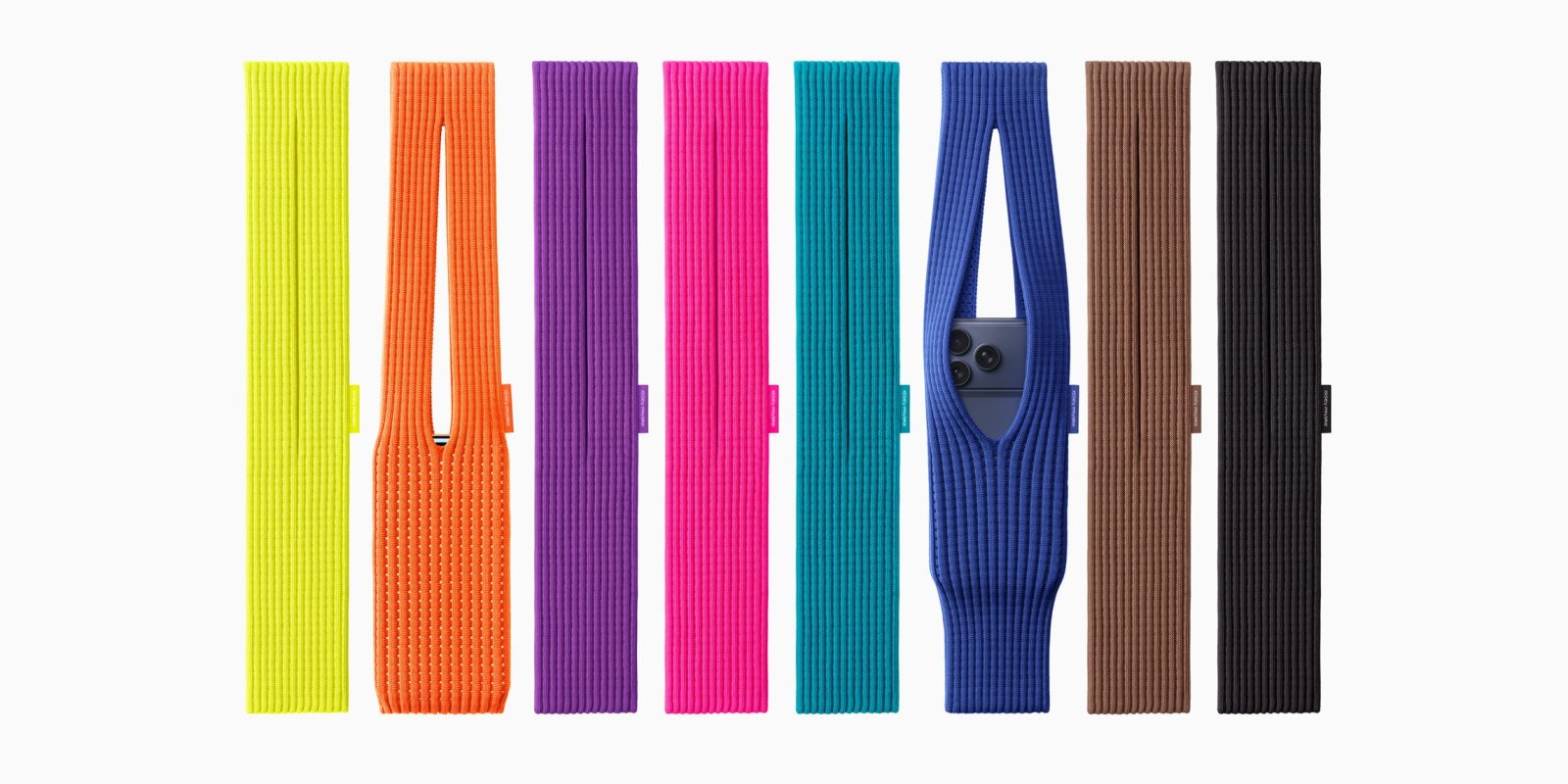
Apple has launched a limited edition accessory for the iPhone, called the iPhone Pocket. It evokes a modern day iPod sock, using a single 3D-knitted cloth to create a wearable pocket. The accessory was designed in collaboration with renowned designer Issey Miyake. The Pocket is kind of like a high-end version of the iPhone Crossbody Strap.

Unlike the 2004-era iPod Socks, the iPhone Pocket is not cheap. Available this Friday, the short strap Pocket will cost $149.95, and the long strap design will cost $229.95.

The Pocket is made of a stretchable cloth material that can hold your iPhone as well as other everyday items. You can stretch the Pocket to glimpse at the iPhone’s screen, without fully taking it out.

The Pocket can be attached to a handbag, worn over the shoulder, or over the wrist.

The design of the accessory was led by Apple in partnership with the Issey Miyake design studio, the makers of Steve Jobs’ iconic turtleneck.

Apple says the iPhone Pocket launch is a limited edition release. It’s unclear how much stock they have. It will also only be available in select regions online; US, UK, France, China, Italy, Japan, Singapore and South Korea. It will be on display in a handful of Apple Stores.

The short strap version is available in lemon, mandarin, purple, pink, peacock, sapphire, cinnamon and black. The longer version is offered in sapphire, cinnamon and black.

Source: 9to5mac

Windows
Mac OS
iOS
Linux
3uTools
Win 64-bit For this device
V9.0 2025-11-11
Download
Win 32-bit For this device
V9.0 2025-11-11
Download
3uTools
Intel Chip How to Identify Chip Type
V9.0 2025-12-02
Download
Apple Silicon
V9.0 2025-12-02
Download
How to Identify Chip Type
1.  Click the Apple icon in the top-left corner of the screen and select About This Mac.
2.  Check the Processor or Chip field to determine if it is "Intel" or "Apple".
Please use the 3uTools PC client to install the iOS client:
1、 Install either the Windows or Mac version of 3uTools on your computer
2、 Open the PC client and connect your device to the computer via USB cable
3、 After the connection is successful, wait for the computer to automatically install the mobile app for the device, or locate “Install Mobile App” on the computer and manually click to install.
3uTools
deb file
V3.01 2025-11-20
Download
rpm file
V3.01 2025-11-20
Download
Windows
Windows
iOS
iOS
Android
Android
TV
TV
3uAirPlayer
Win 64-bit For this device
V6.0.2 2025-11-19
Download
Win 32-bit For this device
V6.0.2 2025-11-19
Download
iOS Device Mirroring (No App Required)
1、 Install 3uAirPlayer on the Windows PC
2、 Open Control Center and select Screen Mirroring
3、 From the list, choose your PC to start mirroring
4、 Or connect your iOS device to the PC via USB to begin mirroring
Scan to get "3uAirPlayer" App
3uAirPlayer TV V1.0.18
2025-11-28
TV System Requirements: Android 7.0 or later
Download the TV installation package, copy it to a USB drive, insert it into your TV or set-top box, then select the file from the home screen to install.