
NEWS

Two iPhone 17 Pro and iPhone Air Colors Appear to Scratch More Easily

09/22/2025

1613

As reported by Bloomberg today, some of the new iPhone 17 Pro and iPhone Air models on display at Apple Stores today are already scratched and scuffed.
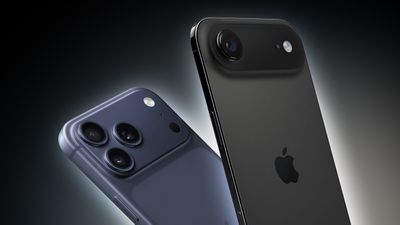
Two iPhone 17 Pro and iPhone Air Colors Appear to Scratch More Easily
French blog Consomac also reported on this topic.

The scratches appear to be most prominent on models with darker finishes, including the iPhone 17 Pro and Pro Max in Deep Blue, and the iPhone Air in Space Black.

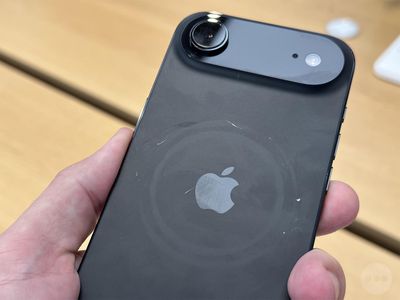
Two iPhone 17 Pro and iPhone Air Colors Appear to Scratch More Easily

Two iPhone 17 Pro and iPhone Air Colors Appear to Scratch More Easily

It is unclear how common this is, or how these devices were handled.

iPhone 17 Pro models feature an aluminum unibody, with a glass-like Ceramic Shield area on the back of the devices, while iPhone 16 Pro models have a titanium frame with a glass back. Titanium and glass are stronger/harder than aluminum, so it is understandable that iPhone 17 Pro models may be more prone to scratching.

As for the iPhone Air, it features a titanium frame with a glass-like Ceramic Shield back, but evidently some scratches are still visible on the Space Black finish.

Of course, some customers visiting an Apple Store are not as careful with iPhone display models as they would be with their personal iPhone, so this is not necessarily a huge problem. But, it is a good reminder to be especially careful.

Source: Macrumors

Windows
Mac OS
iOS
Linux
3uTools
Win 64-bit For this device
V9.0 2025-11-11
Download
Win 32-bit For this device
V9.0 2025-11-11
Download
3uTools
Intel Chip How to Identify Chip Type
V9.0 2025-12-02
Download
Apple Silicon
V9.0 2025-12-02
Download
How to Identify Chip Type
1.  Click the Apple icon in the top-left corner of the screen and select About This Mac.
2.  Check the Processor or Chip field to determine if it is "Intel" or "Apple".
Please use the 3uTools PC client to install the iOS client:
1、 Install either the Windows or Mac version of 3uTools on your computer
2、 Open the PC client and connect your device to the computer via USB cable
3、 After the connection is successful, wait for the computer to automatically install the mobile app for the device, or locate “Install Mobile App” on the computer and manually click to install.
3uTools
deb file
V3.01 2025-11-20
Download
rpm file
V3.01 2025-11-20
Download
Windows
Windows
iOS
iOS
Android
Android
TV
TV
3uAirPlayer
Win 64-bit For this device
V6.0.2 2025-11-19
Download
Win 32-bit For this device
V6.0.2 2025-11-19
Download
iOS Device Mirroring (No App Required)
1、 Install 3uAirPlayer on the Windows PC
2、 Open Control Center and select Screen Mirroring
3、 From the list, choose your PC to start mirroring
4、 Or connect your iOS device to the PC via USB to begin mirroring
Scan to get "3uAirPlayer" App
3uAirPlayer TV V1.0.18
2025-11-28
TV System Requirements: Android 7.0 or later
Download the TV installation package, copy it to a USB drive, insert it into your TV or set-top box, then select the file from the home screen to install.




