 NEWS
NEWS
Apple Seemingly Working on Sleep Score Feature for Apple Watch
 07/24/2025
 1351
1351
Apple may be developing a sleep score feature for the Apple Watch, based on code found in iOS 26 by MacRumors contributor Steve Moser.
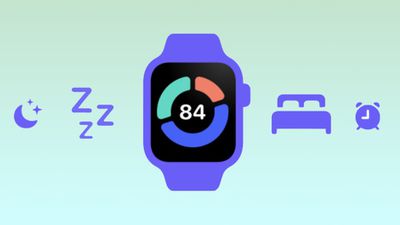
An image buried in the Health app code features an Apple Watch with an "84" on it. Around the sides of the number, there are three bars that are the same colors as some of the sleep stages that can be tracked with the Apple Watch. The orange could represent time awake, the lighter blue may correspond with REM sleep, and the darker blue could be Core or Deep sleep.
The watch graphic is surrounded by sleep-related icons that Apple uses in different places in iOS, including a moon and stars, a "zzz," a bed, an icon representing sleep stages, an alarm clock, and in one spot, a thermometer.
Apple named the image "Watch Focus Score," suggesting that it is indeed some kind of sleep-related score that the watch will provide. With the focus name, it could perhaps provide a prediction on how well you'll be able to function during the day based on the amount of sleep that you got the night before.
Many health tracking devices offer a sleep score, but it's something that Apple has not provided with the Apple Watch yet. The Apple Watch has sleep tracking and separates sleep into REM, Core, and Deep, plus Apple provides time in bed and time awake metrics.
Based on the temperature icon, the future sleep score could take into account multiple health metrics, similar to the Vitals option that Apple introduced in watchOS 11.
We haven't discovered further signs of a sleep score feature, so there is a possibility that this graphic relates to something else. It's also possible that this is an option that Apple plans to introduce with the watchOS 26 update, and we're just seeing the first hints of it.
Source: Macrumors










