
NEWS

iPhone 17 Reaches Key Milestone Ahead of Mass Production

04/29/2025

1106

Apple has completed Engineering Validation Testing (EVT) for at least one iPhone 17 model, according to a paywalled preview of an upcoming DigiTimes report.
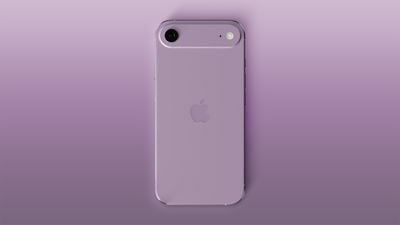
iPhone 17 Reaches Key Milestone Ahead of Mass ProductioniPhone 17 Air mockup based on rumored design


The EVT stage involves Apple testing iPhone 17 prototypes to ensure the hardware works as expected. There are still DVT (Design Validation Test) and PVT (Production Validation Test) stages to follow before the devices enter mass production.


This is a routine but key milestone for Apple to have achieved ahead of the iPhone 17 series launching in the usual month of September.

Following the EVT stage, there is still a window for Apple to make some smaller iPhone spec changes, if necessary. For example, Apple supply chain analyst Ming-Chi Kuo recently claimed that Apple would make a final decision on whether to include 8GB or 12GB of RAM in the iPhone 17 base model by May. At a minimum, Kuo expects the iPhone 17 Air, iPhone 17 Pro, and iPhone 17 Pro Max to be equipped with 12GB of RAM.

Read our iPhone 17, iPhone 17 Air, and iPhone 17 Pro roundups to learn more about the upcoming devices and their rumored feature sets.

Source: Macrumors

Windows
Mac OS
iOS
Linux
3uTools
Win 64-bit For this device
V9.0 2025-11-11
Download
Win 32-bit For this device
V9.0 2025-11-11
Download
3uTools
Intel Chip How to Identify Chip Type
V9.0 2025-12-02
Download
Apple Silicon
V9.0 2025-12-02
Download
How to Identify Chip Type
1.  Click the Apple icon in the top-left corner of the screen and select About This Mac.
2.  Check the Processor or Chip field to determine if it is "Intel" or "Apple".
Please use the 3uTools PC client to install the iOS client:
1、 Install either the Windows or Mac version of 3uTools on your computer
2、 Open the PC client and connect your device to the computer via USB cable
3、 After the connection is successful, wait for the computer to automatically install the mobile app for the device, or locate “Install Mobile App” on the computer and manually click to install.
3uTools
deb file
V3.01 2025-11-20
Download
rpm file
V3.01 2025-11-20
Download
Windows
Windows
iOS
iOS
Android
Android
TV
TV
3uAirPlayer
Win 64-bit For this device
V6.0.2 2025-11-19
Download
Win 32-bit For this device
V6.0.2 2025-11-19
Download
iOS Device Mirroring (No App Required)
1、 Install 3uAirPlayer on the Windows PC
2、 Open Control Center and select Screen Mirroring
3、 From the list, choose your PC to start mirroring
4、 Or connect your iOS device to the PC via USB to begin mirroring
Scan to get "3uAirPlayer" App
3uAirPlayer TV V1.0.18
2025-11-28
TV System Requirements: Android 7.0 or later
Download the TV installation package, copy it to a USB drive, insert it into your TV or set-top box, then select the file from the home screen to install.




