
NEWS

iOS 18 Expands Convenient AirPods-Like Pairing to More Bluetooth and Wi-Fi Accessories

06/24/2024

1012

During its WWDC 2024 keynote last week, Apple announced that iOS 18 and iPadOS 18 will let apps offer AirPods-like pairing for more Bluetooth or Wi-Fi accessories.
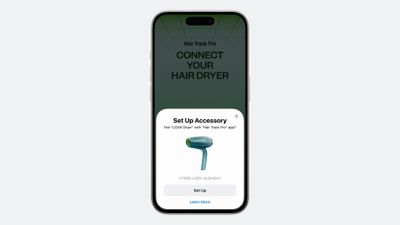
iOS 18 Expands Convenient AirPods-Like Pairing to More Bluetooth and Wi-Fi Accessories
In apps that implement this new pairing process, users would be able to connect accessories to their devices directly in the app, without having to open the Settings app. In addition, Apple said this pairing process increases privacy by preventing accessory makers from gaining visibility into other devices on the user's local network.

Developers can add the AirPods-like pairing process to their apps with the new AccessorySetupKit framework, with more details available in this WWDC 2024 coding video.

iOS 18 is currently in beta for developers, and a public beta will be released in July. The update should be widely released in September, but it will take time for accessory makers to add support for this pairing process to their apps.

Source: Macrumors

Windows
Mac OS
iOS
Linux
3uTools
Win 64-bit For this device
V9.0 2025-11-11
Download
Win 32-bit For this device
V9.0 2025-11-11
Download
3uTools
Intel Chip How to Identify Chip Type
V9.0 2025-12-02
Download
Apple Silicon
V9.0 2025-12-02
Download
How to Identify Chip Type
1.  Click the Apple icon in the top-left corner of the screen and select About This Mac.
2.  Check the Processor or Chip field to determine if it is "Intel" or "Apple".
Please use the 3uTools PC client to install the iOS client:
1、 Install either the Windows or Mac version of 3uTools on your computer
2、 Open the PC client and connect your device to the computer via USB cable
3、 After the connection is successful, wait for the computer to automatically install the mobile app for the device, or locate “Install Mobile App” on the computer and manually click to install.
3uTools
deb file
V3.01 2025-11-20
Download
rpm file
V3.01 2025-11-20
Download
Windows
Windows
iOS
iOS
Android
Android
TV
TV
3uAirPlayer
Win 64-bit For this device
V6.0.2 2025-11-19
Download
Win 32-bit For this device
V6.0.2 2025-11-19
Download
iOS Device Mirroring (No App Required)
1、 Install 3uAirPlayer on the Windows PC
2、 Open Control Center and select Screen Mirroring
3、 From the list, choose your PC to start mirroring
4、 Or connect your iOS device to the PC via USB to begin mirroring
Scan to get "3uAirPlayer" App
3uAirPlayer TV V1.0.18
2025-11-28
TV System Requirements: Android 7.0 or later
Download the TV installation package, copy it to a USB drive, insert it into your TV or set-top box, then select the file from the home screen to install.




