 NEWS
NEWS
iPhone 8 Losing Home Button?
 02/16/2017
 3836
3836
iPhone 8 rumors have been doing the rounds for some time now, but no feature is confirmed unless Apple gives a formal indication of its existence. One such feature which might be part of the upcoming device is a display-embedded fingerprint sensor, for which Apple filed a patent Monday.
The filing confirms Apple is actually working on the feature, and it also mentions a screen with infrared light emitters and sensors interwoven with regular RGB diodes.
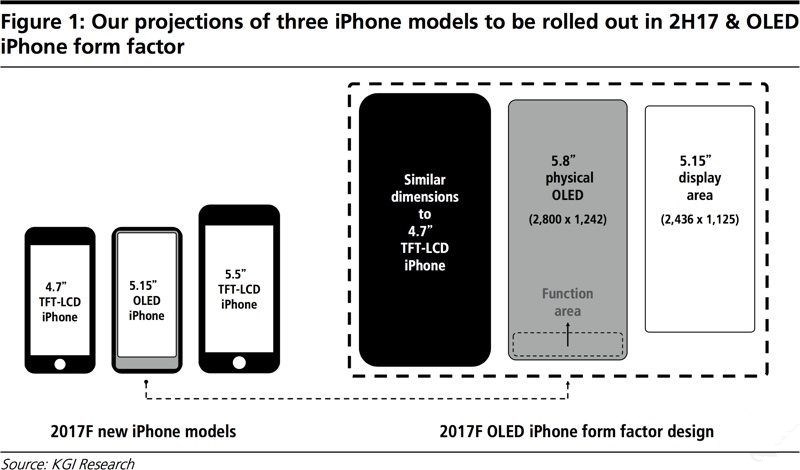
It sounds simple, yet the feature actually confirms multiple iPhone 8 rumors in one go. A display embedded fingerprint sensor would actually make the Apple home button with TouchID sensor redundant, so it is safe to conclude that Apple has actually taken steps towards getting rid of its proprietary home button, which has been there on every iPhone since the first iteration.
Building on that, no home button would mean that there would be no use for the thick bottom bezel of the phone, which is an indication that Apple might be going in for a larger display rather than leave the space on the body of the phone vacant and unused. The only kind of display, which would make the best use of the available screen space, is an edge-to-edge display.
Therefore, the presence of the patent has confirmed major features for the upcoming iPhone. Apple acquired LuxVue — a tech company specializing in micro-LEDs, which are needed to manufacture edge-to-edge OLED displays — in 2014. LuxVue also owns patents such as one for manufacturing thin flexible displays.Putting everything together, it seems that the standout feature of the 2017 iPhone might be its display.
Edge-to-edge displays seem to be the ideal choice for premium smartphones with Samsung also rumored to opt for one for its Galaxy S8 smartphone.
Source: ibtimes










