 NEWS
NEWS
Apple Adds Mail-in Option for Customers Ahead of iPhone X
 09/12/2017
 4474
4474
Ahead of the expected launch of Apple's hotly anticipated iPhone X, the company recently updated its iPhone Upgrade Program to include a new trade-in feature that allows customers to mail their old handset instead of visiting an Apple store.
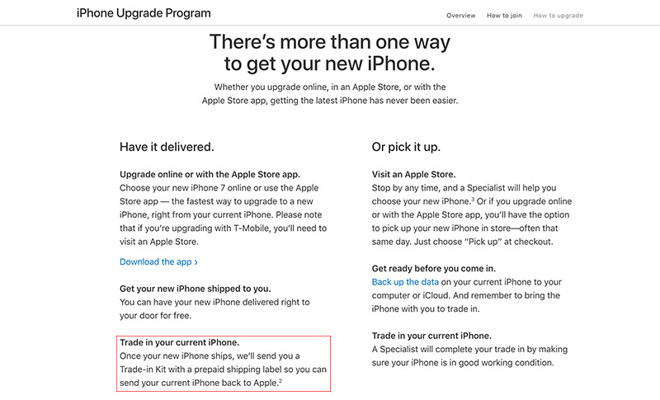
Apple is now advertising the new option on its iPhone Upgrade Program webpage, saying customers taking advantage of the service no longer have to make the trek down to an Apple retail location to turn in their old iPhone.
The new option was first spotted by a MacRumors forum member on Monday.
As noted on Apple's page, customers can expect their trade-in kit to arrive in the mail after their new phone ships. The kit includes a box and prepaid shipping label, which customers use to send the old unit back to Apple for processing.
Previously, members of the program in the market for a new phone were required to schedule a trade-in appointment with an Apple store specialist. The process led to issues last year, when customers were impacted by constrained iPhone 7 supply. Some Apple stores set aside handsets for iPhone Upgrade Program customers, but most were limited to stock on hand, meaning many members missed out on a launch day unit.
The new mail-in system could bypass that hurdle, but incoming handsets are still expected to power on, be free of cracks and have an intact and working display.
Apple introduced the iPhone Upgrade Program alongside iPhone 6s in 2015 as a means to promote annual handset upgrades. The service has been popular with customers, with early analyst estimates suggesting customers used the program to purchase some 250,000 units during its first quarter of availability.
Apple could see record upgrades this year with the introduction of a newly designed iPhone X device, which is expected to boast a full-face OLED screen, facial recognition technology, wireless charging and more. The flagship will be joined by two iPhone 8 series handsets that include incremental upgrades over last year's iPhone 7 and 7 Plus.
Source: appleinsider










