
NEWS

Apple Pay May Launch in Italy as Soon as Tomorrow

05/17/2017

5137

Apple Pay could arrive in Italy as soon as tomorrow. The imminent launch of Apple's mobile payment system in Italy has been rumored for several weeks now, but the website claims to have spoken to three different sources from the retail and banking sector who independently confirmed that Apple Pay is set to go live on Wednesday throughout the country. 

Apple Pay May Launch in Italy as Soon as Tomorrow


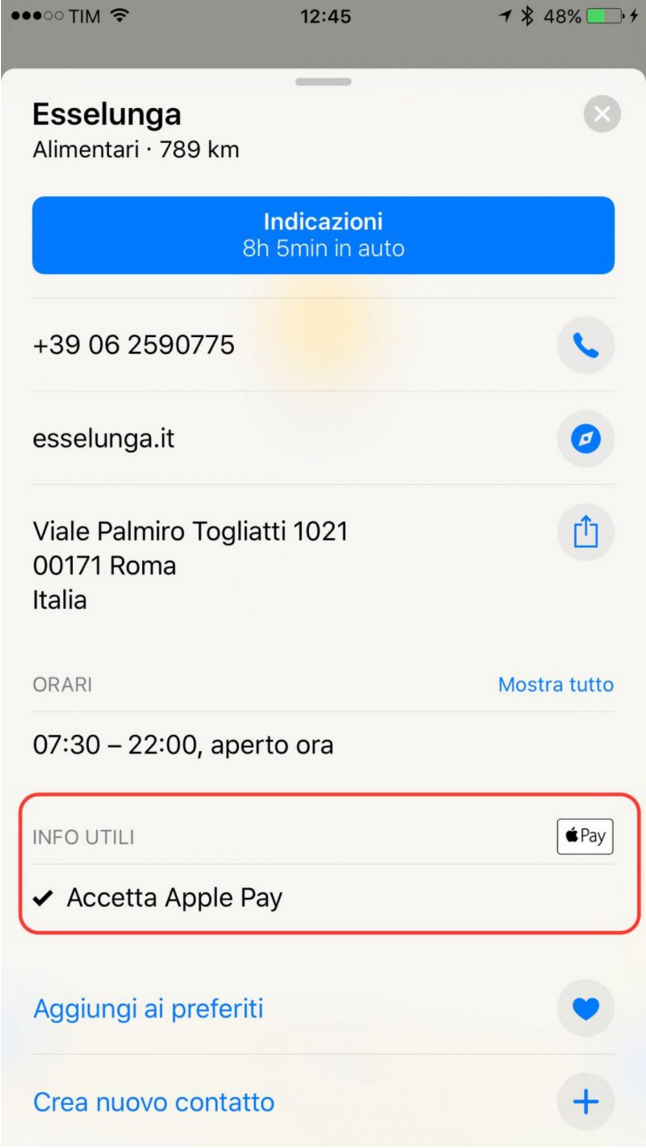
The exact time of the launch remains unknown, according to the sources, but the general expectation is that Apple Pay will be announced in the morning. Meanwhile, in another indication of the impending launch, the Apple Maps app has started listing Apple Pay as "accepted" at certain retail outlets in Italy, as the following image provided by MacPost.itshows. 


Last week, an Apple support document shows Italy highlighted on a map which is supposed to indicate Apple Pay participating banks and card issuers. Apple's regional Italian website has listed Apple Pay as "coming soon" since March. Now it looks like it may be only hours away. The contactless payment service is expected to be available in the country through UniCredit, Carrefour Bank, and Boon.


Source: macrumors

Windows
Mac OS
iOS
Linux
3uTools
Win 64-bit For this device
V9.0 2025-11-11
Download
Win 32-bit For this device
V9.0 2025-11-11
Download
3uTools
Intel Chip How to Identify Chip Type
V9.0 2025-12-02
Download
Apple Chip
V9.0 2025-12-02
Download
How to Identify Chip Type
1.  Click the Apple icon in the top-left corner of the screen and select About This Mac.
2.  Check the Processor or Chip field to determine if it is "Intel" or "Apple".
Please use the 3uTools PC client to install the iOS client:
1、 Install either the Windows or Mac version of 3uTools on your computer
2、 Open the PC client and connect your device to the computer via USB cable
3、 After the connection is successful, wait for the computer to automatically install the mobile app for the device, or locate “Install Mobile App” on the computer and manually click to install.
3uTools
deb file
V3.01 2025-11-20
Download
rpm file
V3.01 2025-11-20
Download
Windows
Windows
iOS
iOS
Android
Android
TV
TV
3uAirPlayer
Win 64-bit For this device
V6.0.2 2025-11-19
Download
Win 32-bit For this device
V6.0.2 2025-11-19
Download
iOS Device Mirroring (No App Required)
1、 Install 3uAirPlayer on the Windows PC
2、 Open Control Center and select Screen Mirroring
3、 From the list, choose your PC to start mirroring
4、 Or connect your iOS device to the PC via USB to begin mirroring
Scan to get "3uAirPlayer" App
3uAirPlayer TV V1.0.18
2025-11-28
TV System Requirements: Android 7.0 or later
Download the TV installation package, copy it to a USB drive, insert it into your TV or set-top box, then select the file from the home screen to install.




