
NEWS

Samsung Developing 'Wide Fold' with iPhone Fold-Like Design Ahead of Apple's 2026 Launch

12/25/2025

35

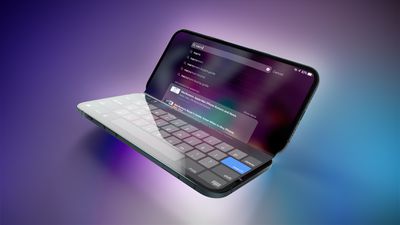
Samsung is working on a new foldable smartphone that's wider and shorter than the models that it's released before, according to Korean news site ETNews. The "Wide Fold" will compete with Apple's iPhone Fold that's set to launch in September 2026.
Samsung Developing 'Wide Fold' with iPhone Fold-Like Design Ahead of Apple's 2026 Launch
Samsung's existing Galaxy Z Fold7 display is 6.5 inches when closed, and 8 inches when open, with a 21:9 aspect ratio when folded and a 20:18 aspect ratio when open. Samsung has used a similar size for its prior Z Fold devices.

Rumors suggest the ‌iPhone‌ Fold's display will measure in at 5.3 to 5.5 inches when closed, and 7.5 to 7.8 inches when open (rumors vary). It's squatter and wider than Samsung's taller, narrower design, with a 4:3 aspect ratio when open.

Samsung's "Wide Fold" will coincidentally feature a 7.6-inch display when open, and a 5.4-inch display when closed. It's also expected to have a 4:3 aspect ratio, making it noticeably different than prior models because of the more square shape.

The wider 4:3 aspect ratio is expected to be more comfortable to hold than a taller device, similar to a notebook.

ETNews says that Samsung plans to release its wider foldable device in the fall of 2026, which is also when the ‌iPhone‌ Fold will be coming out. The wide fold will join the next-generation Galaxy Fold for a total of two "Fold" devices, plus there will be a flip device.

Source: Macrumors

Windows
Mac OS
iOS
Linux
3uTools
Win 64-bit For this device
V9.0 2025-11-11
Download
Win 32-bit For this device
V9.0 2025-11-11
Download
3uTools
Intel Chip How to Identify Chip Type
V9.0 2025-12-02
Download
Apple Silicon
V9.0 2025-12-02
Download
How to Identify Chip Type
1.  Click the Apple icon in the top-left corner of the screen and select About This Mac.
2.  Check the Processor or Chip field to determine if it is "Intel" or "Apple".
Please use the 3uTools PC client to install the iOS client:
1、 Install either the Windows or Mac version of 3uTools on your computer
2、 Open the PC client and connect your device to the computer via USB cable
3、 After the connection is successful, wait for the computer to automatically install the mobile app for the device, or locate “Install Mobile App” on the computer and manually click to install.
3uTools
deb file
V3.01 2025-11-20
Download
rpm file
V3.01 2025-11-20
Download
Windows
Windows
iOS
iOS
Android
Android
TV
TV
3uAirPlayer
Win 64-bit For this device
V6.0.2 2025-11-19
Download
Win 32-bit For this device
V6.0.2 2025-11-19
Download
iOS Device Mirroring (No App Required)
1、 Install 3uAirPlayer on the Windows PC
2、 Open Control Center and select Screen Mirroring
3、 From the list, choose your PC to start mirroring
4、 Or connect your iOS device to the PC via USB to begin mirroring
Scan to get "3uAirPlayer" App
3uAirPlayer TV V1.0.18
2025-11-28
TV System Requirements: Android 7.0 or later
Download the TV installation package, copy it to a USB drive, insert it into your TV or set-top box, then select the file from the home screen to install.




