
TUTORIALS

What’s Baseband?

07/20/2017

9777


Baseband is commonly known as BB, Baseband can be defined as a communication module. It contains a communication system. It is usually used to control iPhone’s communication procedures, telephone communications, WiFi wireless communications, as well as Bluetooth communications.


Warm Prompt:


iPhone's signal is directly related to its baseband. Under normal circumstances, if you upgrade the firmware of your iDevice, it’s baseband will follow the upgrade. So please be careful when you flash/ restore/ upgrade your iDevice with carrier lock, because it can not be unlocked if you upgrade iDevice’s baseband.


There are some online methods for you to restore/ upgrade firmware, but only for specific iDevices and specific systems, you need to check clearly before your operation.


Once the baseband is upgraded, it is difficult to downgrade it. At present, only part of the iPhone 3GS can be downgraded from 06.15 to 05.13.04.


How to check iPhone’s baseband?


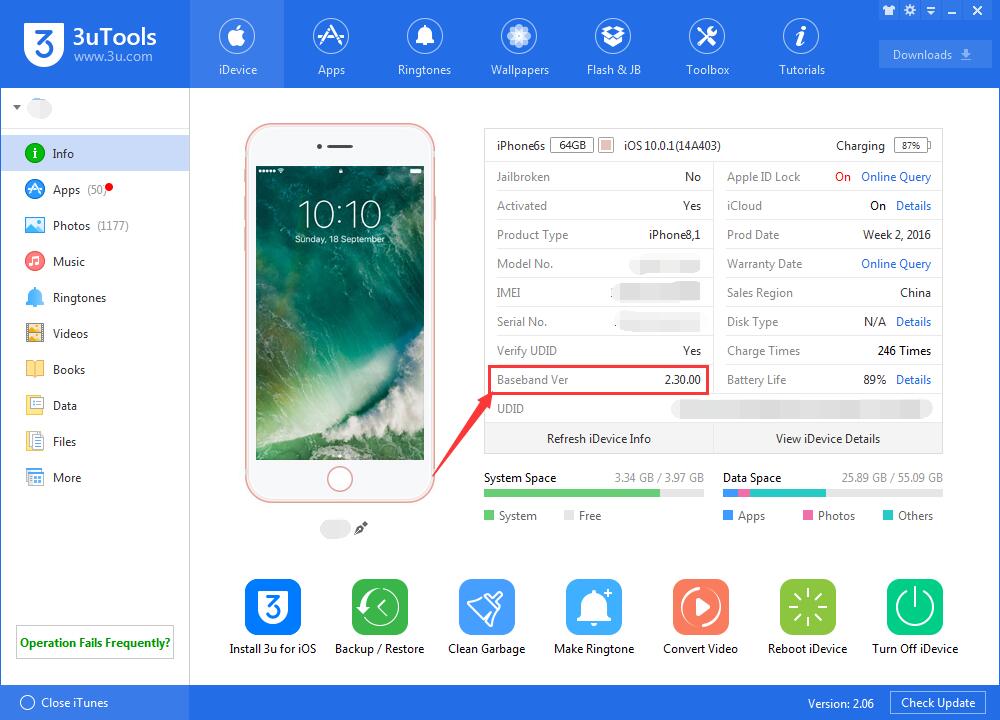
A. Download and install the latest 3uTool on your PC. Connect iPhone to PC using the USB cable. As shown below, 3uTools will show all your iPhone’s basic information.

What’s Baseband?


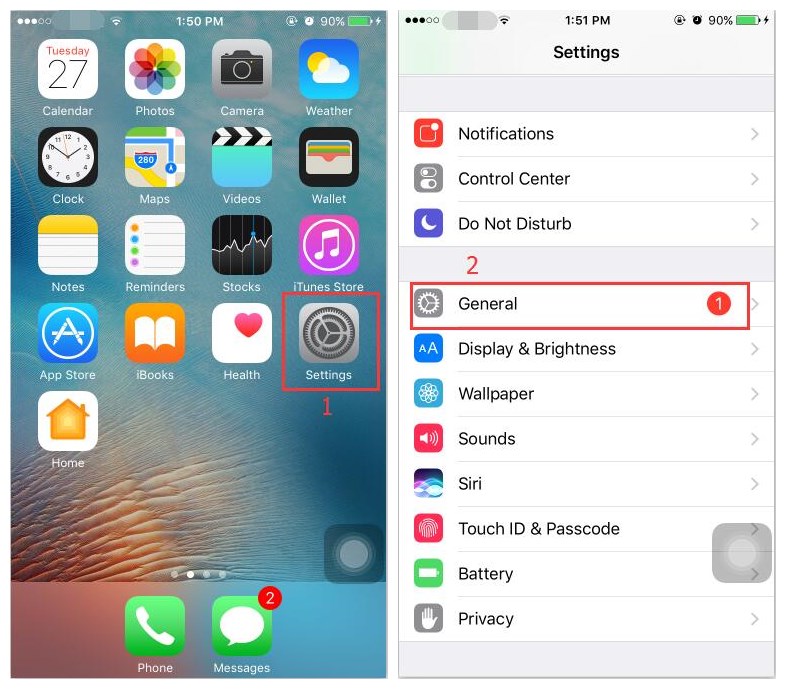
B1. Launch Settings app of your iPhone -> click General.

What’s Baseband?

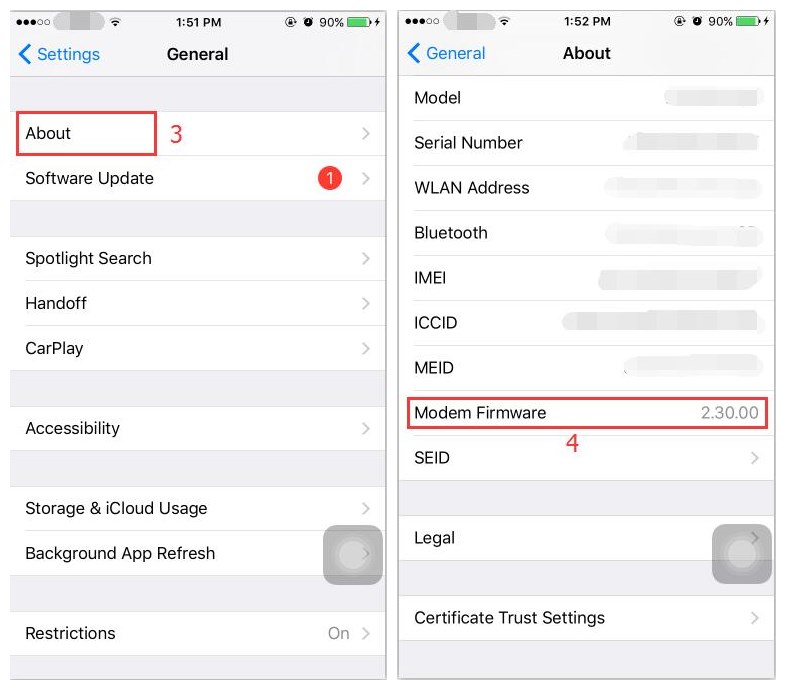
B2. Continue to click About -> Modern Firmware.

What’s Baseband?

Windows
Mac OS
iOS
Linux
3uTools
Win 64-bit For this device
V9.0 2025-11-11
Download
Win 32-bit For this device
V9.0 2025-11-11
Download
3uTools
Intel Chip How to Identify Chip Type
V9.0 2025-12-02
Download
Apple Chip
V9.0 2025-12-02
Download
How to Identify Chip Type
1.  Click the Apple icon in the top-left corner of the screen and select About This Mac.
2.  Check the Processor or Chip field to determine if it is "Intel" or "Apple".
Please use the 3uTools PC client to install the iOS client:
1、 Install either the Windows or Mac version of 3uTools on your computer
2、 Open the PC client and connect your device to the computer via USB cable
3、 After the connection is successful, wait for the computer to automatically install the mobile app for the device, or locate “Install Mobile App” on the computer and manually click to install.
3uTools
deb file
V3.01 2025-11-20
Download
rpm file
V3.01 2025-11-20
Download
Windows
Windows
iOS
iOS
Android
Android
TV
TV
3uAirPlayer
Win 64-bit For this device
V6.0.2 2025-11-19
Download
Win 32-bit For this device
V6.0.2 2025-11-19
Download
iOS Device Mirroring (No App Required)
1、 Install 3uAirPlayer on the Windows PC
2、 Open Control Center and select Screen Mirroring
3、 From the list, choose your PC to start mirroring
4、 Or connect your iOS device to the PC via USB to begin mirroring
Scan to get "3uAirPlayer" App
3uAirPlayer TV V1.0.18
2025-11-28
TV System Requirements: Android 7.0 or later
Download the TV installation package, copy it to a USB drive, insert it into your TV or set-top box, then select the file from the home screen to install.





