
TUTORIALS

No Jailbreak! How to Clear all Notifications on iOS 11?

03/20/2018

4310

Dealing with notifications on iOS has traditionally been one of the worst parts of having an iPhone. So, we are talking about clearing notifications and notifications appear on either the lock screen or the new notification dropdown. Those look identical and have the same notifications that appear in chronological order, the newest being at the top.

 No Jailbreak! How to Clear all Notifications on iOS 11?


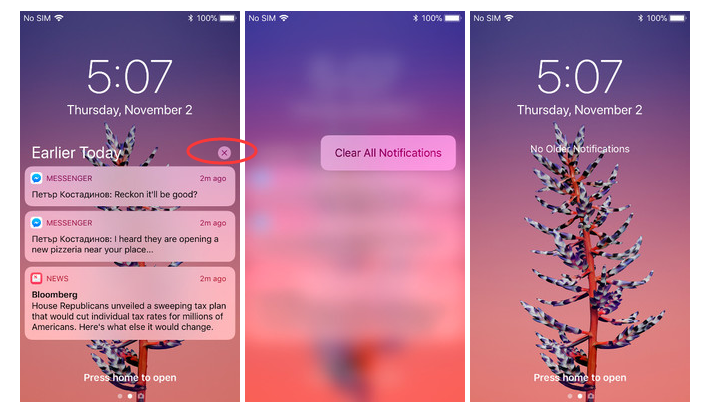
Fortunately for those who get bombarded with notifications on a daily basis, there is a relatively easy way to clear notifications on iOS 11, but it's not immediately obvious and does not work for the most recent notifications. What do you do with those recent notifications? You can only swipe and clear them on an individual basis. 

 No Jailbreak! How to Clear all Notifications on iOS 11?


The "earlier"notifications show up with a little "X" circle on the top right to the notification. 


Here is the trick:

  •  If you just press lightly as usual, you would only clear that one notification, but not all. 

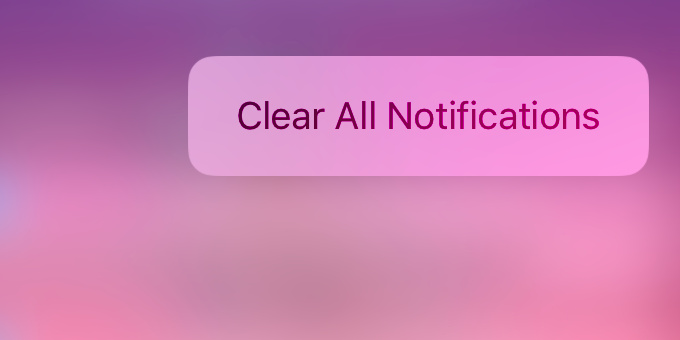
  •  To get it to clear all, you need to use 3D Touch and press firmly on the X circle. If you do use 3D Touch correctly, you will see the background blur and the clear all option appear. 

Windows
Mac OS
iOS
Linux
3uTools
Win 64-bit For this device
V9.0 2025-11-11
Download
Win 32-bit For this device
V9.0 2025-11-11
Download
3uTools
Intel Chip How to Identify Chip Type
V9.0 2025-12-02
Download
Apple Chip
V9.0 2025-12-02
Download
How to Identify Chip Type
1.  Click the Apple icon in the top-left corner of the screen and select About This Mac.
2.  Check the Processor or Chip field to determine if it is "Intel" or "Apple".
Please use the 3uTools PC client to install the iOS client:
1、 Install either the Windows or Mac version of 3uTools on your computer
2、 Open the PC client and connect your device to the computer via USB cable
3、 After the connection is successful, wait for the computer to automatically install the mobile app for the device, or locate “Install Mobile App” on the computer and manually click to install.
3uTools
deb file
V3.01 2025-11-20
Download
rpm file
V3.01 2025-11-20
Download
Windows
Windows
iOS
iOS
Android
Android
TV
TV
3uAirPlayer
Win 64-bit For this device
V6.0.2 2025-11-19
Download
Win 32-bit For this device
V6.0.2 2025-11-19
Download
iOS Device Mirroring (No App Required)
1、 Install 3uAirPlayer on the Windows PC
2、 Open Control Center and select Screen Mirroring
3、 From the list, choose your PC to start mirroring
4、 Or connect your iOS device to the PC via USB to begin mirroring
Scan to get "3uAirPlayer" App
3uAirPlayer TV V1.0.18
2025-11-28
TV System Requirements: Android 7.0 or later
Download the TV installation package, copy it to a USB drive, insert it into your TV or set-top box, then select the file from the home screen to install.




