TUTORIALS

Cydia Impactor 0.9.43 For Windows Released To Fix http-win.cpp:159 Error

02/08/2018

18577

Cydia Impactor 0.9.43 For Windows Released To Fix http-win.cpp:159 Error


Cydia Impactor 0.9.43 for Windows has been released to fix http-win.cpp:159 “Peer certificate cannot be authenticated with given CA certificates SSL certificate problem: unable to get local issuer certificate.” error.


Announced by Jay ‘Saurik’ Freeman on Twitter, the release comes quickly after the issue came into light in the last twenty four hours or so and has only been affecting Windows users of Cydia Impactor.


For those who don’t already know, Cydia Impactor is an easy-to-use tool available on Windows, Mac and Linux which is used by most modern semi-untethered IPA-based jailbreaks for re-signing and re-sideloading the jailbreak app every seven days or so. It’s also one of the more popular tools used for sideloading the non-Cydia Substrate-based tweaks and hacked “++” apps on non-jailbroken devices.


In case any of you is not familiar with the process of using Cydia Impactor for sideloading apps, we have a full step by step tutorial on it which you can check out in detail here: Sideload iOS Apps On Windows, Mac With Cydia Impactor Without Jailbreak, Here’s How.

Cydia Impactor 0.9.43 For Windows Released To Fix http-win.cpp:159 Error


The latest version of Cydia Impactor version 0.9.43 can be downloaded for Windows from the official portal over at cydiaimpactor.com. The Mac and Linux versions of Cydia Impactor remains same at version 0.9.42 as they were unaffected by the “http-win.cpp:159” error.


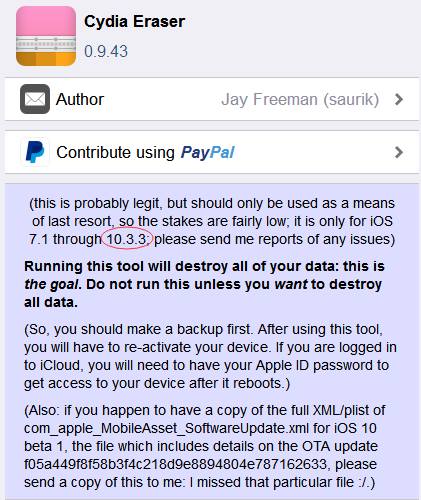
And from the update log, we can see that Cydia Eraser supports iOS 10.3.3. So does it means there will be iOS 10.3.3 jailbreak? Let's stay tuned.


Cydia Impactor 0.9.43 For Windows Released To Fix http-win.cpp:159 Error

Windows
Mac OS
iOS
Linux
3uTools
Win 64-bit For this device
V9.0 2025-11-11
Download
Win 32-bit For this device
V9.0 2025-11-11
Download
3uTools
Intel Chip How to Identify Chip Type
V9.0 2025-12-02
Download
Apple Chip
V9.0 2025-12-02
Download
How to Identify Chip Type
1.  Click the Apple icon in the top-left corner of the screen and select About This Mac.
2.  Check the Processor or Chip field to determine if it is "Intel" or "Apple".
Please use the 3uTools PC client to install the iOS client:
1、 Install either the Windows or Mac version of 3uTools on your computer
2、 Open the PC client and connect your device to the computer via USB cable
3、 After the connection is successful, wait for the computer to automatically install the mobile app for the device, or locate “Install Mobile App” on the computer and manually click to install.
3uTools
deb file
V3.01 2025-11-20
Download
rpm file
V3.01 2025-11-20
Download
Windows
Windows
iOS
iOS
Android
Android
TV
TV
3uAirPlayer
Win 64-bit For this device
V6.0.2 2025-11-19
Download
Win 32-bit For this device
V6.0.2 2025-11-19
Download
iOS Device Mirroring (No App Required)
1、 Install 3uAirPlayer on the Windows PC
2、 Open Control Center and select Screen Mirroring
3、 From the list, choose your PC to start mirroring
4、 Or connect your iOS device to the PC via USB to begin mirroring
Scan to get "3uAirPlayer" App
3uAirPlayer TV V1.0.18
2025-11-28
TV System Requirements: Android 7.0 or later
Download the TV installation package, copy it to a USB drive, insert it into your TV or set-top box, then select the file from the home screen to install.