 TUTORIALS
(iPhone Buyer's Guide) iPhoneX, iPhone 8 and iPhone 8 Plus, Which One Should You Buy?
 09/15/2017
 6622
6622
At Apple’s press event, Apple CEO Tim Cook introduced three flagship iPhones for us at once. It is difficult for some iOS users to decide which one to buy, this tutorial will help you make your decision.
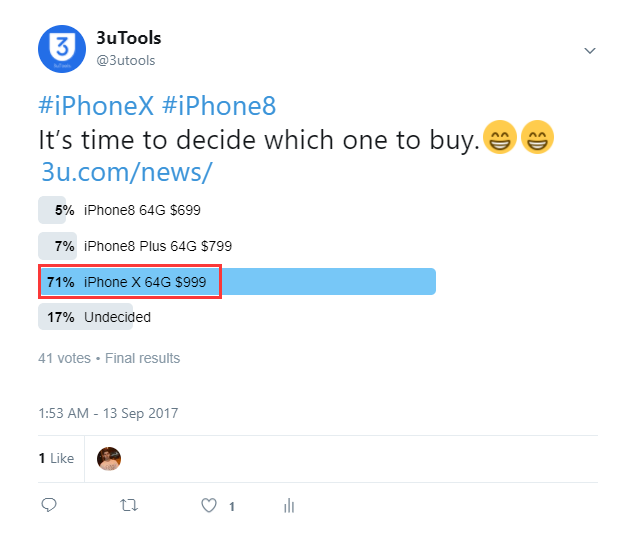
3uTools also created a poll on Twitter, the result showed that for most of iPhone users, they may trend to purchase the most advanced iPhone X. You may take this vote result as reference.
iPhone X
iPhone X— Apple’s new flagship phone, and features its latest technology. Available for preorder on Oct. 22, and expected to ship Nov. 3. But it starts at $999. iPhone X plus a few more sensors, and it also has a large, higher-definition screen inside a relatively compact body. Besides, it uses these for Face ID, a new way of authenticating who’s using the phone. If you want the latest and greatest from Apple, this is it. But for most of iOS users, iPhone X is too expensive to afford.
iPhone 8
iPhone 8 has a more powerful camera, more storage, and a faster processor than the previous model. Available for preorder on Sept. 15, and in stores Sept. 22. And it starts at $699. In addition, iPhone 8 is water resistant, has wireless charging, and features a new tempered glass back. If you want to upgrade your iPhone, iPhone 8 will be a good choice, but iPhone 8 remained the same design as the older models, there is no big difference than the previous one.
iPhone 8 Plus
The iPhone 8 Plus introduces an all-new glass design. It has all the same features as the iPhone 8, as well two rear-facing cameras that allow it to perceive depth and create dramatic portrait photos. Available for preorder on Sept. 15, and in stores Sept. 22. And it starts at $799. If you like iPhone with larger screen, you may consider to purchase iPhone 8 Plus.










