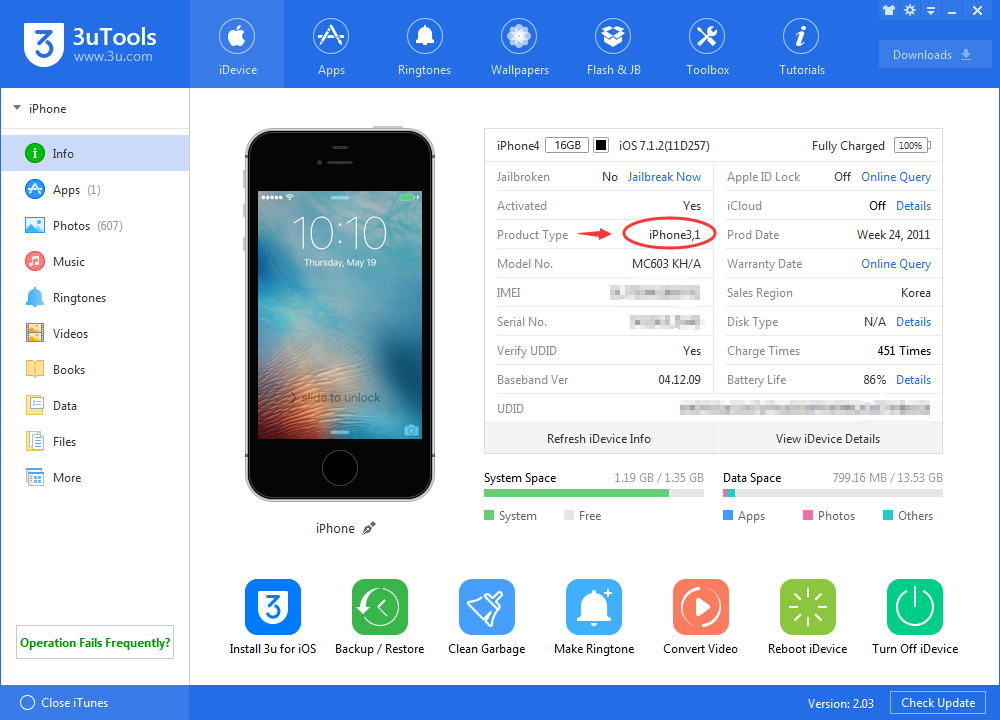
Connect your device to the PC and Open 3uTools. Click “iDevice”, you will see as below, the product type is circled in red. Now you could download firmware based on your product type.
1. Click the Apple icon in the top-left corner of the screen and select About This Mac.
2. Check the Processor or Chip field to determine if it is "Intel" or "Apple".
Please use the 3uTools PC client to install the iOS client:
1、Install either the Windows or Mac version of 3uTools on your computer
2、Open the PC client and connect your device to the computer via USB cable
3、After the connection is successful, wait for the computer to automatically install the mobile app for the device, or locate “Install Mobile App” on the computer and manually click to install.
Download the TV installation package, copy it to a USB drive, insert it into your TV or set-top box, then select the file from the home screen to install.









 11/24/2017
 270423