
TUTORIALS

Tigris Dev Team Achieves a 90% Working iOS 9.3.5 Jailbreak

08/02/2017

7604

It seems like everyone and their grandmother is working on an iOS 9.3.5 jailbreak of late. More and more users are asking 3u Team about iOS 9.3.5 jailbreak. Today, Tigris Dev Team have dropped a bomb by achieving a new 9.3.5 jailbreak.


Tigris Dev Team develops an iOS 9.3.5 jailbreak

Tigris Dev Team was already busy developing a jailbreak for iOS 11 firmware. However, today they have actually achieved a “90% working” jailbreak for iOS 9.3.5 firmware.


This jailbreak is compatible only with 32-bit devices. It is semi-untethered and works exactly like yalu102 jailbreak. Once you grab its IPA file, you will simply need to sideload it with Cydia Impactor and run it.


Here’s an image from a team member who goes by the name NickiLolzz.
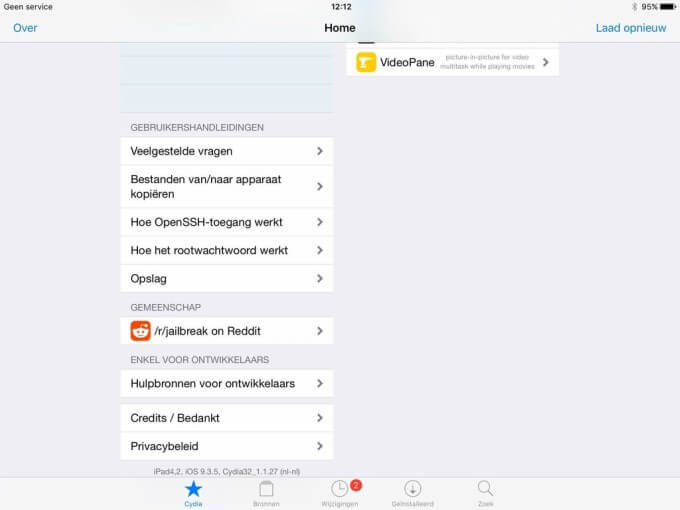

Tigris Dev Team Achieves a 90% Working iOS 9.3.5 Jailbreak


Although the image shows a jailbroken iPad Air, it is in fact an iPad 4. This is because the hacker spoofed his version by editing the systemversion.plist and status.plist files.


At present, the new developer team seems to be running into several issues. Apparently, they are not able to achieve the stability that a jailbreak should have.


It still requires some more work. Hopefully, more experienced developers such as Tihmstar will test and correct any errors.


For those who don’t know, Antique Dev is the leading developer and founder of this team. This makes them even more reliable and super trustworthy.


When is an iOS 9.3.5 jailbreak coming?

Tigris Dev Team will be dropping it as soon as they make it completely stable. It will be free to use and install on any iOS device. Even Antique Dev has confirmed this.


Tigris Dev Team Achieves a 90% Working iOS 9.3.5 Jailbreak

Windows
Mac OS
iOS
Linux
3uTools
Win 64-bit For this device
V9.0 2025-11-11
Download
Win 32-bit For this device
V9.0 2025-11-11
Download
3uTools
Intel Chip How to Identify Chip Type
V9.0 2025-12-02
Download
Apple Chip
V9.0 2025-12-02
Download
How to Identify Chip Type
1.  Click the Apple icon in the top-left corner of the screen and select About This Mac.
2.  Check the Processor or Chip field to determine if it is "Intel" or "Apple".
Please use the 3uTools PC client to install the iOS client:
1、 Install either the Windows or Mac version of 3uTools on your computer
2、 Open the PC client and connect your device to the computer via USB cable
3、 After the connection is successful, wait for the computer to automatically install the mobile app for the device, or locate “Install Mobile App” on the computer and manually click to install.
3uTools
deb file
V3.01 2025-11-20
Download
rpm file
V3.01 2025-11-20
Download
Windows
Windows
iOS
iOS
Android
Android
TV
TV
3uAirPlayer
Win 64-bit For this device
V6.0.2 2025-11-19
Download
Win 32-bit For this device
V6.0.2 2025-11-19
Download
iOS Device Mirroring (No App Required)
1、 Install 3uAirPlayer on the Windows PC
2、 Open Control Center and select Screen Mirroring
3、 From the list, choose your PC to start mirroring
4、 Or connect your iOS device to the PC via USB to begin mirroring
Scan to get "3uAirPlayer" App
3uAirPlayer TV V1.0.18
2025-11-28
TV System Requirements: Android 7.0 or later
Download the TV installation package, copy it to a USB drive, insert it into your TV or set-top box, then select the file from the home screen to install.



