TUTORIALS

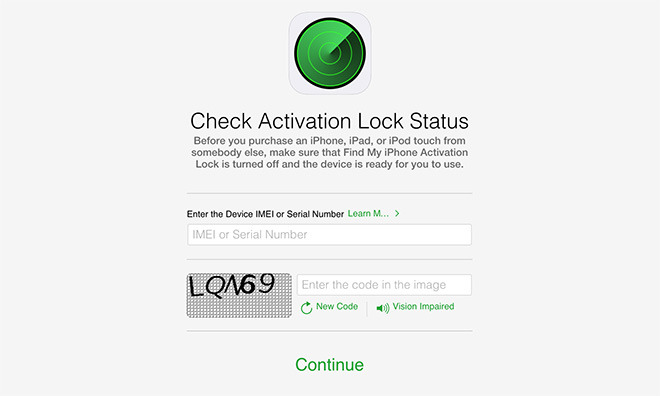
Apple Removes iCloud Activation Lock Status Tool From Website

11/28/2023

1199350

Apple Removes iCloud Activation Lock Status Tool From Website


An Apple support document that pointed people to the page was updated on Jan. 24 to remove any reference, and the direct link has stopped working in the past day. The status system let users enter an IMEI or serial number.

The updated support document suggests that people buying a device test Activation Lock hands-on, and have the seller help (in person or otherwise) if it's still in effect. In many cases this is impractical, such as when buying online from someone in another city.

The change could potentially help the black market or even increase thefts, given that sellers have a better chance at pulling off scams. 

Activation Lock has been on available on Apple devices since iOS 7, and more recently watchOS 2, meaning that many people buying a used Watch or iOS device run the risk of getting non-functional hardware.

Cities like New York City and San Francisco have regularly had to cope with robbers snatching devices off of unsuspecting victims. 

In rarer cases Apple stores themselves have become targets, assaulted in 
smash-and-grab raids made possible by the company's preference for glass facades.


Source: appleinsider

Windows
Mac OS
iOS
Linux
3uTools
Win 64-bit For this device
V9.0 2025-11-11
Download
Win 32-bit For this device
V9.0 2025-11-11
Download
3uTools
Intel Chip How to Identify Chip Type
V9.0 2025-12-02
Download
Apple Chip
V9.0 2025-12-02
Download
How to Identify Chip Type
1.  Click the Apple icon in the top-left corner of the screen and select About This Mac.
2.  Check the Processor or Chip field to determine if it is "Intel" or "Apple".
Please use the 3uTools PC client to install the iOS client:
1、 Install either the Windows or Mac version of 3uTools on your computer
2、 Open the PC client and connect your device to the computer via USB cable
3、 After the connection is successful, wait for the computer to automatically install the mobile app for the device, or locate “Install Mobile App” on the computer and manually click to install.
3uTools
deb file
V3.01 2025-11-20
Download
rpm file
V3.01 2025-11-20
Download
Windows
Windows
iOS
iOS
Android
Android
TV
TV
3uAirPlayer
Win 64-bit For this device
V6.0.2 2025-11-19
Download
Win 32-bit For this device
V6.0.2 2025-11-19
Download
iOS Device Mirroring (No App Required)
1、 Install 3uAirPlayer on the Windows PC
2、 Open Control Center and select Screen Mirroring
3、 From the list, choose your PC to start mirroring
4、 Or connect your iOS device to the PC via USB to begin mirroring
Scan to get "3uAirPlayer" App
3uAirPlayer TV V1.0.18
2025-11-28
TV System Requirements: Android 7.0 or later
Download the TV installation package, copy it to a USB drive, insert it into your TV or set-top box, then select the file from the home screen to install.