
TUTORIALS

Don't Like the iPhone X's Notch? There's an App That Can Help

02/08/2018

5429

Many iPhone X users will eventually get used to the “notch” on the iPhone X housing the camera array, but if you’re one of the early adopters who simply can’t deal with it, there is a new solution you might want to check out. 


Over the weekend, developer Axiem Systems released an app on the App Store called Notch Remover.


Don't Like the iPhone X's Notch? There's an App That Can Help


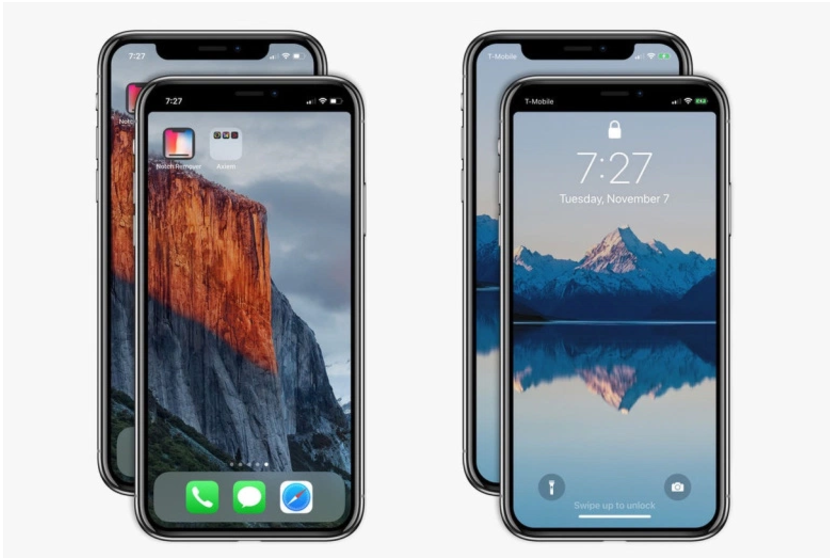
As the name suggests, the app allows you to effectively eliminate the notch on the iPhone X by adding a black bar to the top of images that you can then manually assign as wallpapers from the phone’s Settings menu. With the modified wallpapers, the “ears” atop the display will fade away and your display will look normal again.


Why exactly Apple didn’t decide Notch Remover breaks any of these rules is unclear, but nonetheless, it is available on the App Store for $0.99 right now. It won’t change the way that apps function or the way that videos look on your iPhone X, but if you’re desperate to see less of the notch, it’s probably your best option at the moment.


Source: bgr

Windows
Mac OS
iOS
Linux
3uTools
Win 64-bit For this device
V9.0 2025-11-11
Download
Win 32-bit For this device
V9.0 2025-11-11
Download
3uTools
Intel Chip How to Identify Chip Type
V9.0 2025-12-02
Download
Apple Chip
V9.0 2025-12-02
Download
How to Identify Chip Type
1.  Click the Apple icon in the top-left corner of the screen and select About This Mac.
2.  Check the Processor or Chip field to determine if it is "Intel" or "Apple".
Please use the 3uTools PC client to install the iOS client:
1、 Install either the Windows or Mac version of 3uTools on your computer
2、 Open the PC client and connect your device to the computer via USB cable
3、 After the connection is successful, wait for the computer to automatically install the mobile app for the device, or locate “Install Mobile App” on the computer and manually click to install.
3uTools
deb file
V3.01 2025-11-20
Download
rpm file
V3.01 2025-11-20
Download
Windows
Windows
iOS
iOS
Android
Android
TV
TV
3uAirPlayer
Win 64-bit For this device
V6.0.2 2025-11-19
Download
Win 32-bit For this device
V6.0.2 2025-11-19
Download
iOS Device Mirroring (No App Required)
1、 Install 3uAirPlayer on the Windows PC
2、 Open Control Center and select Screen Mirroring
3、 From the list, choose your PC to start mirroring
4、 Or connect your iOS device to the PC via USB to begin mirroring
Scan to get "3uAirPlayer" App
3uAirPlayer TV V1.0.18
2025-11-28
TV System Requirements: Android 7.0 or later
Download the TV installation package, copy it to a USB drive, insert it into your TV or set-top box, then select the file from the home screen to install.




