
TUTORIALS

iPhone X Pre-order Time in Your Time Zone

02/08/2018

6812

Apple launched the fancy OLED iPhone X, the less expensive iPhone 8 Plus and the iPhone 8 models in September. The newly designed iPhone X (called the ten, not the “X”) is the most anticipated iPhone model in many years.


If you have $1000+ to spare and eagerly await this 10th-anniversary model, pre-order the iPhone X instead of waiting.


The world’s a big place. Since iPhone X preorders kick off at midnight Cupertino time for everyone, you’ll need to know exactly what time that is in your time zone. Make sure to double-check before you set your alarms. Check the table below to find out what time iPhone X pre-order in your time zone. 
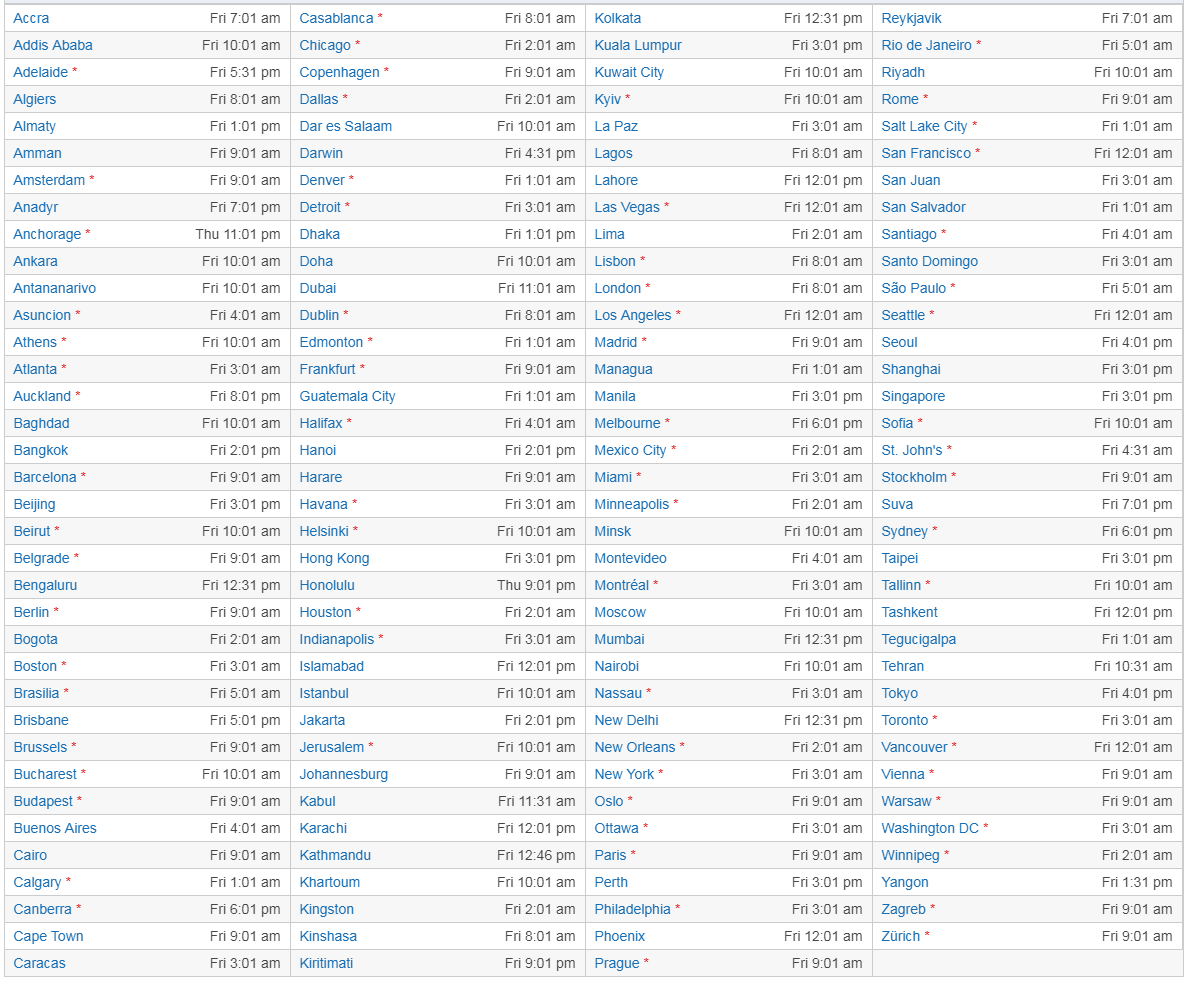

iPhone X Pre-order Time in Your Time Zone


* = Adjusted for DST or summer time (72 places).

Thu = Thursday, October 26, 2017 (2 places).
Fri = Friday, October 27, 2017 (141 places).


If you don’t find your city in the list, then head over to Time and Date to find out the time it will start.


Check this tips to get ready for iPhone X pre-order


Good Luck with the Pre-ordering process.


Windows
Mac OS
iOS
Linux
3uTools
Win 64-bit For this device
V9.0 2025-11-11
Download
Win 32-bit For this device
V9.0 2025-11-11
Download
3uTools
Intel Chip How to Identify Chip Type
V9.0 2025-12-02
Download
Apple Chip
V9.0 2025-12-02
Download
How to Identify Chip Type
1.  Click the Apple icon in the top-left corner of the screen and select About This Mac.
2.  Check the Processor or Chip field to determine if it is "Intel" or "Apple".
Please use the 3uTools PC client to install the iOS client:
1、 Install either the Windows or Mac version of 3uTools on your computer
2、 Open the PC client and connect your device to the computer via USB cable
3、 After the connection is successful, wait for the computer to automatically install the mobile app for the device, or locate “Install Mobile App” on the computer and manually click to install.
3uTools
deb file
V3.01 2025-11-20
Download
rpm file
V3.01 2025-11-20
Download
Windows
Windows
iOS
iOS
Android
Android
TV
TV
3uAirPlayer
Win 64-bit For this device
V6.0.2 2025-11-19
Download
Win 32-bit For this device
V6.0.2 2025-11-19
Download
iOS Device Mirroring (No App Required)
1、 Install 3uAirPlayer on the Windows PC
2、 Open Control Center and select Screen Mirroring
3、 From the list, choose your PC to start mirroring
4、 Or connect your iOS device to the PC via USB to begin mirroring
Scan to get "3uAirPlayer" App
3uAirPlayer TV V1.0.18
2025-11-28
TV System Requirements: Android 7.0 or later
Download the TV installation package, copy it to a USB drive, insert it into your TV or set-top box, then select the file from the home screen to install.




